There is no single measurement that is correct for every printed QR code. The right size comes from the QR version, the module size, the amount of encoded data, the printing method and resolution, the camera doing the scanning, the environment it is scanned in, and the quiet zone the code needs around it.
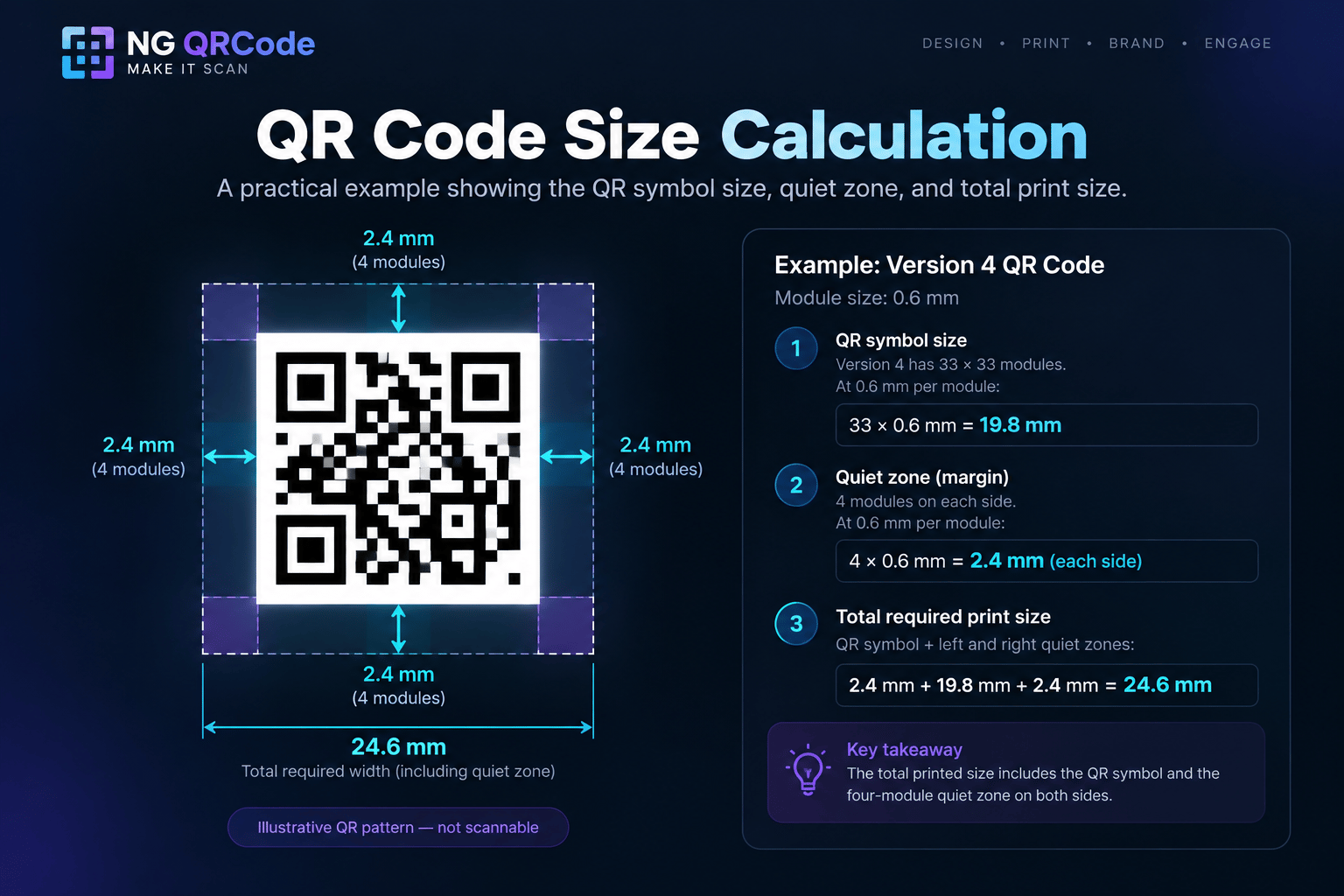
The practical approach is to work out the size rather than guess it: choose the module size your printing method and scanning distance can support, multiply it by the number of modules in your QR version, add the four-module margin on every side, then print a proof at final size and scan it.
What Determines the Physical Size of a QR Code?
Physical size is determined by module size and version.
Those two numbers sit underneath every other factor:
- QR version sets how many modules there are per side.
- Module size sets how large each of those modules is when printed.
- Amount of encoded data influences which version you end up on.
- Printing method and printer resolution limit how small a module can be reproduced cleanly.
- Scanner or camera capability limits how small a module can be resolved.
- Intended scanning environment covers distance, lighting, glare, and the surface the code is printed on.
- Required quiet zone adds clear space that the layout has to reserve.
Change any one of these and the correct printed size changes with it. That is why a fixed figure such as “always use 2 cm × 2 cm” does not hold up across real print jobs.
What Is a QR Code Module?
A module is one of the small squares that make up the QR code pattern. It is the smallest unit of the symbol, and every other measurement is expressed in multiples of it.
Module size is what you actually control when preparing artwork for print. Set the module size and the version, and the printed width follows automatically.
Larger modules generally provide more stable and easier reading. That is the single most useful principle when you are deciding how much space to give a QR code on a printed piece.
How QR Code Version Affects Size
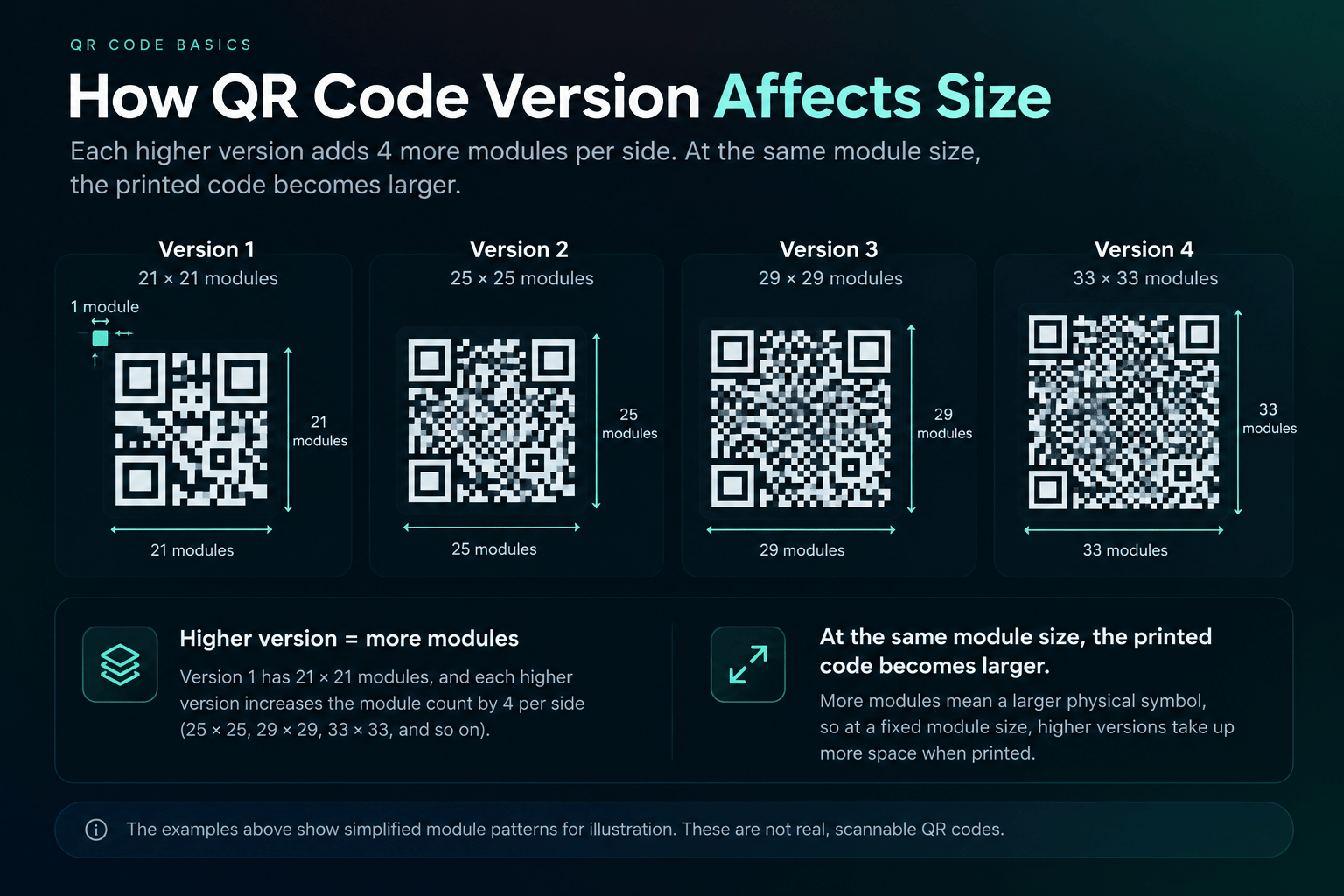
QR Code versions range from Version 1 to Version 40. Version 1 has 21 × 21 modules, and each higher version increases the number of modules per side by four.
So the module count per side is:
- Version 1 — 21 × 21 modules
- Version 2 — 25 × 25 modules
- Version 3 — 29 × 29 modules
- Version 4 — 33 × 33 modules
The pattern continues in steps of four all the way to Version 40. A higher version packs more modules into the symbol, which means that at a fixed printed width each module gets smaller, and at a fixed module size the printed code gets wider.
How Big Should a QR Code Be for Printing?
Big enough that the modules survive both the printing process and the camera, at the distance people will scan from.
To arrive at a number rather than a guess:
- Establish how far away the code will be scanned.
- Establish what the printing method and material can reproduce cleanly.
- Choose a module size that satisfies both.
- Multiply it by the module count for your QR version.
- Add the four-module quiet zone on each side.
- Print a proof at that size and scan it in the real environment.
If the proof fails, the fix is usually to increase the module size, reduce the encoded data so the code drops to a lower version, or both.
How Small Can a QR Code Be?
Down to the point where either the printer can no longer reproduce a module cleanly or the camera can no longer resolve it, whichever limit you hit first.
Because the printer and the scanning device both affect the practical minimum size, that floor is specific to your setup. A code that works at a given size on a laser-printed sheet may fail at the same size on a textured carton or a small curved label.
This is why a universal minimum print size is not a useful claim. Establish your own minimum by testing the real combination of artwork, printer, material, and phone.
Does QR Code Size Affect Scanning?
Yes. Size is what determines how large each module appears to the scanner, and larger modules generally provide more stable and easier reading.
Size is not a cure for everything, though. A physically large QR code can still fail if it has poor contrast, heavy visual interference, or no clear margin. Size works alongside the other factors covered in our guide to QR code design, not instead of them.
Does More Data Make a QR Code Larger?
It can. More encoded data can push the code to a higher version, and each higher version adds four modules per side.
That leaves two outcomes, depending on what you hold constant:
- Hold the module size constant, and the printed code becomes physically wider.
- Hold the printed width constant, and every module becomes smaller.
The second outcome is the one that quietly breaks print jobs. If space is tight, shorten the encoded data first. Error correction level also affects how much data the symbol carries, which is covered in our guide to QR code error correction.
Does the Quiet Zone Count Toward QR Code Size?
For layout purposes, yes. The usable area also includes the four-module quiet zone, so the space the code occupies on the page is larger than the symbol itself.
It helps to keep three measurements separate:
- QR symbol size — the modules of the code itself, version × module size.
- Quiet-zone margin — four modules of clear space on each side.
- Total required area — the symbol plus the margin on both sides, which is what your layout must reserve.
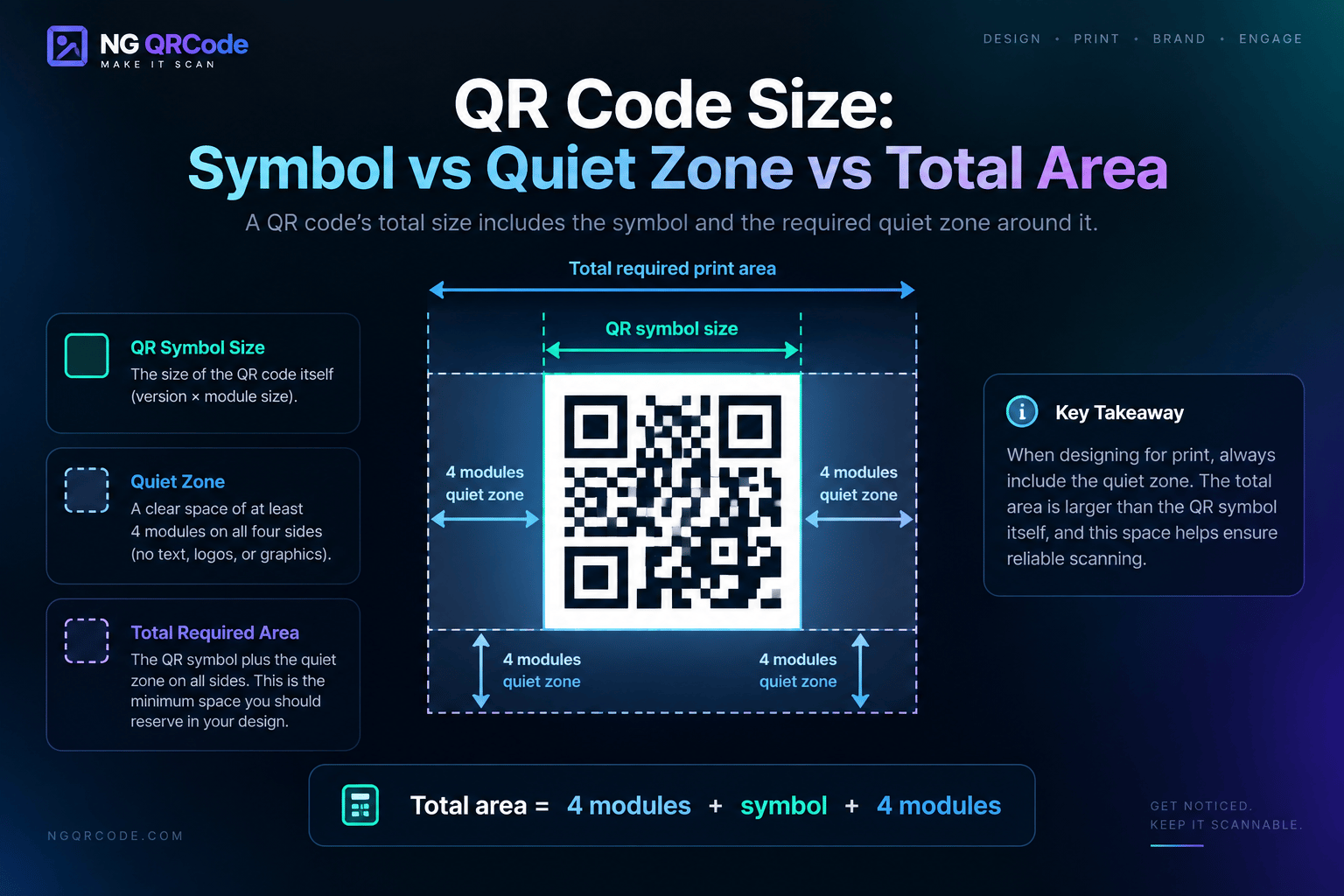
Designers who measure only the symbol end up crowding the code once the surrounding artwork goes in. Our guide to the QR code quiet zone covers what that margin is protecting.
QR Code Size for Different Print Uses
The same code needs different treatment depending on where it ends up, mostly because scanning distance and surface change.