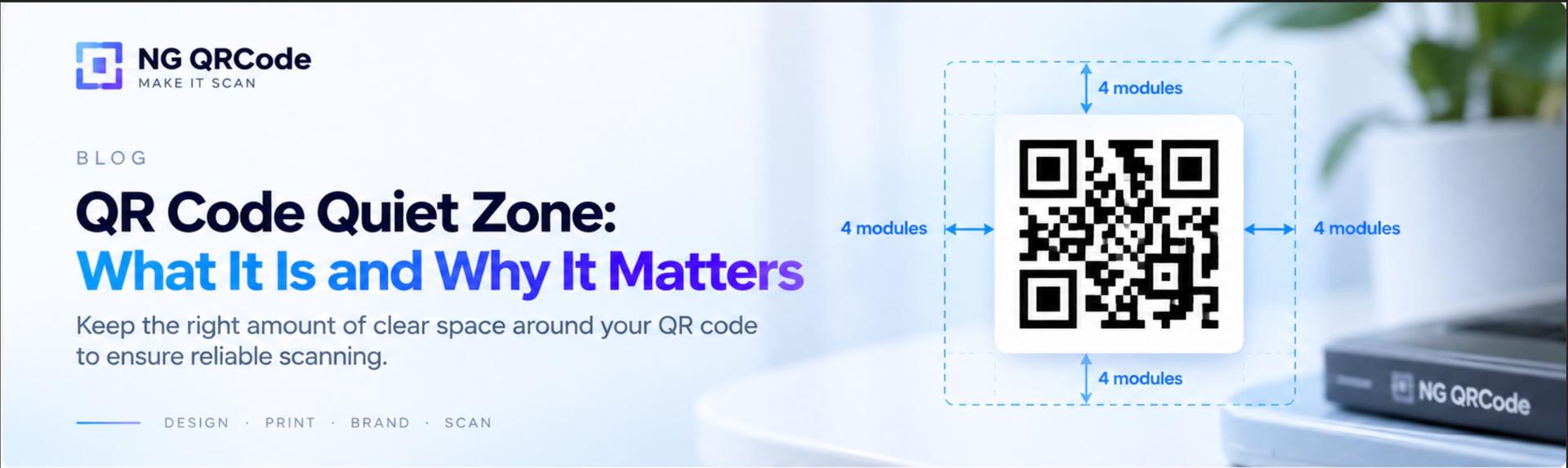
A QR code may look like a simple square of black and white modules, but the space around it is just as important as the code itself.
That empty area is called the quiet zone or margin.
If text, images, borders, patterns, or other design elements get too close to the QR code, scanners may have difficulty identifying where the code begins and ends.
For a standard QR Code, DENSO WAVE specifies a four-module-wide clear margin on all four sides.
For designers creating branded, artistic, or printed QR codes, understanding the quiet zone is essential.
What Is a QR Code Quiet Zone?
The QR code quiet zone is the clear, empty space surrounding the QR code.
It separates the QR code from the visual elements around it so that a scanner can distinguish the code from its background.
The quiet zone should not contain:
- Text
- Images
- Logos
- Decorative patterns
- Borders that interfere with the code
- Other QR codes
- High-contrast visual elements
Think of the quiet zone as a visual buffer between the QR code and everything around it.
Without enough separation, the QR code may blend into its surroundings and become harder to scan.
How Much Quiet Zone Does a QR Code Need?
A standard QR Code requires a quiet zone of at least four modules on every side.
But what exactly is a module?
A module is one of the small square elements that make up the QR code.
For example, if one module in your QR code is 1 mm wide, the four-module quiet zone would be:
4 × 1 mm = 4 mm
So you would need at least 4 mm of clear space on each side of the QR code.
The important point is that the quiet zone is measured in modules, not as a fixed number of millimeters or pixels.
As the module size changes, the physical size of the required quiet zone changes too.
What Does “Four Modules” Mean?
Imagine the QR code is made from a grid of small squares.
One of those squares is one module.
The quiet zone should extend outward from the QR code by at least four of those module widths.
For example:
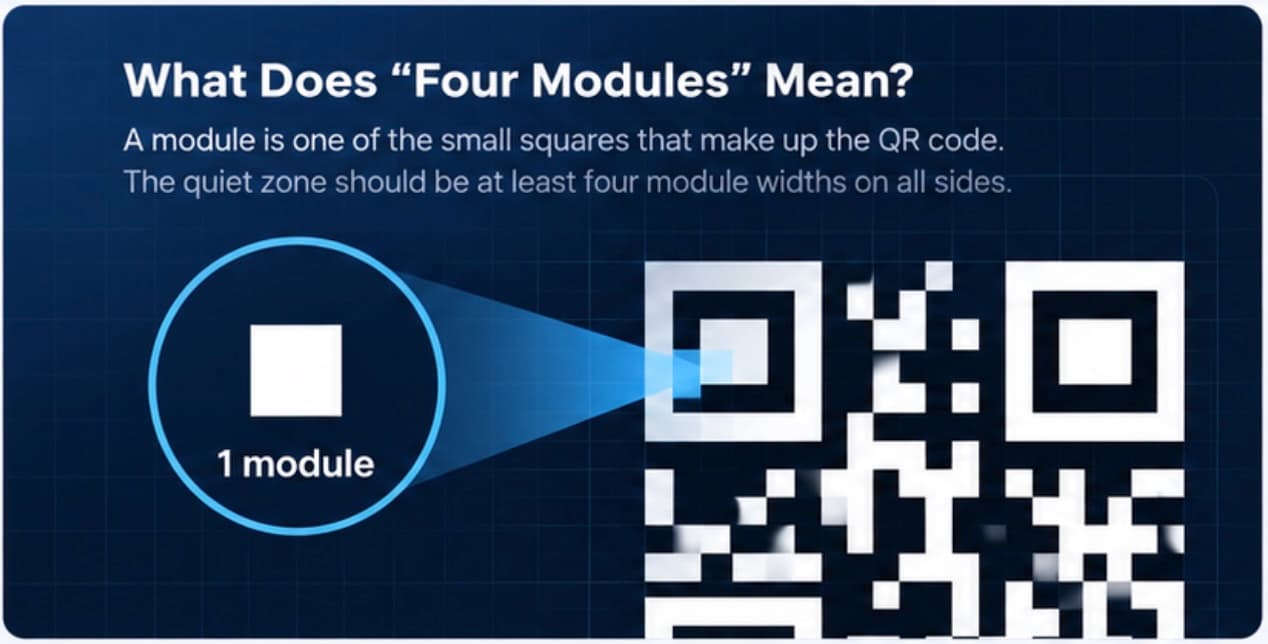
The same four-module minimum applies to the top, bottom, left, and right sides.
DENSO WAVE's QR Code guidance explicitly specifies a four-module-wide margin around the symbol.
Why Does a QR Code Need a Quiet Zone?
QR scanners need to distinguish the QR code from its background.
The finder patterns, timing patterns, data modules, and surrounding area work together to help the scanner locate and interpret the symbol.
When text or graphics are placed immediately next to the QR code, the boundary between the QR code and its surroundings can become less obvious.
DENSO WAVE specifically lists QR codes surrounded by letters or pictures without the required margin as examples that can become difficult or impossible to read.
This becomes especially important when QR codes are used in:
- Posters
- Product packaging
- Business cards
- Menus
- Flyers
- Event materials
- Product labels
- Advertisements
- Social media graphics
Can You Put Text Next to a QR Code?
Yes, but you should leave enough clear space between the text and the QR code.
For example:
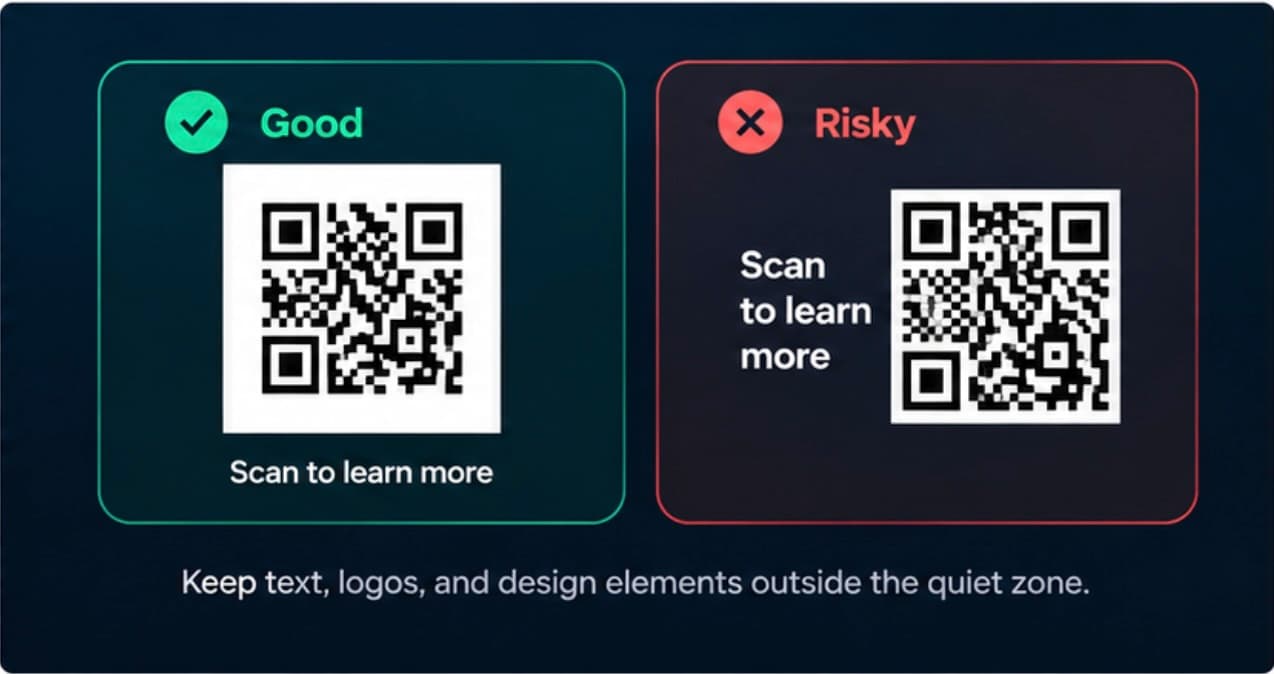
where the text is placed directly against the QR code without sufficient separation.
The problem isn't simply that text exists near a QR code. The problem is when surrounding elements interfere with the required quiet zone.
Can a Logo Extend Into the Quiet Zone?
It is better not to.
A logo can be incorporated into a QR code design, but it should not remove the required clear space surrounding the QR symbol.
This is different from placing a logo inside the QR code itself.
When designing a branded QR code, think about two separate areas:
- The QR code itself
- The quiet zone surrounding it
Both need to remain visually clear enough for reliable scanning.
If you are adding a logo to the QR code, you should also consider the error correction level, logo placement, contrast, and final size.
Read our guide on QR Code Logo Size for more details.
QR Code Quiet Zone for Artistic QR Codes
Quiet zones become even more important when creating artistic QR codes.
Artistic QR codes often contain:
- Colors
- Textures
- Illustrations
- Background imagery
- Brand elements
- Decorative shapes
- Creative compositions
These elements can make a QR code visually distinctive, but they can also make it harder for scanners to separate the QR code from its surroundings.
A good artistic QR code therefore needs more than an attractive design.
It needs a clear boundary around the QR code.
The goal is simple:
Make the QR code visually interesting without making its scanning area ambiguous.
This is one of the key principles behind effective QR code design.
QR Code Quiet Zone for Printing
The quiet zone matters particularly when a QR code is printed.
The final printed size depends on the QR code's version, module size, and required margin. DENSO WAVE's guidance shows that the four-module margin is included when calculating the total area required for a printed QR code.
For example, if:
- QR code = 29 × 29 modules
- Each module = 0.5 mm
Then the QR code itself is:
29 × 0.5 mm = 14.5 mm
The quiet zone adds:
4 × 0.5 mm = 2 mm on each side
So the total required width becomes:
2 mm + 14.5 mm + 2 mm = 18.5 mm
This is why the space occupied by a QR code in a design is larger than the QR symbol itself.
The module size also affects readability. DENSO WAVE notes that larger modules generally make a QR code easier and more stable for scanners to read, while the appropriate size depends on the printing and scanning environment.
Common QR Code Quiet Zone Mistakes
1. Removing the white space
Trying to make a QR code fit into a smaller design by removing its surrounding margin can create scanning problems.
2. Adding text directly beside the code
Text should not occupy the required quiet zone.
3. Adding decorative borders
A decorative frame immediately around the QR code can interfere with the visual separation needed for scanning.
4. Placing the QR code on a busy background
Even if the QR code itself is technically correct, a visually complicated background can make scanning more difficult.
5. Assuming error correction fixes everything
Higher error correction can help a QR code recover from certain types of damage, but it does not mean you can ignore the quiet zone.
Error correction and quiet zone solve different problems.
Read our guide to QR Code Error Correction to understand the difference.
Quiet Zone vs. Error Correction
These two concepts are often confused.
Quiet zone:
Protects the QR code from interference around its edges.
Error correction:
Allows the QR code to recover data when part of the symbol is damaged or obscured.
They work in different ways.
A QR code with high error correction still needs an appropriate quiet zone.
Likewise, a QR code with a perfect quiet zone can still fail to scan if the code itself is damaged, distorted, too small, or has insufficient contrast.
For reliable QR code design, you need to consider both.
How to Check Your QR Code Quiet Zone
Before publishing or printing a QR code, check the following:
- Is there clear space around all four sides?
- Is the quiet zone at least four modules wide?
- Is any text touching the QR code?
- Is a border interfering with the margin?
- Is the background too busy?
- Is the QR code large enough for its intended use?
- Does the final printed or displayed version scan correctly?
Most importantly, test the final version.
A QR code that scans perfectly in your design software may behave differently after printing, resizing, compression, or placement on a real product.
QR Code Quiet Zone Best Practices
Use this checklist when designing a QR code:
- Keep at least four modules of clear space around a standard QR Code.
- Keep text and graphics outside the quiet zone.
- Avoid busy backgrounds directly around the QR code.
- Don't assume error correction can compensate for a missing quiet zone.
- Consider the final physical size of the QR code.
- Test the actual final design before publishing.
- For printed materials, test the printed version rather than only the digital artwork.
- For artistic QR codes, treat the quiet zone as part of the design rather than leftover space.