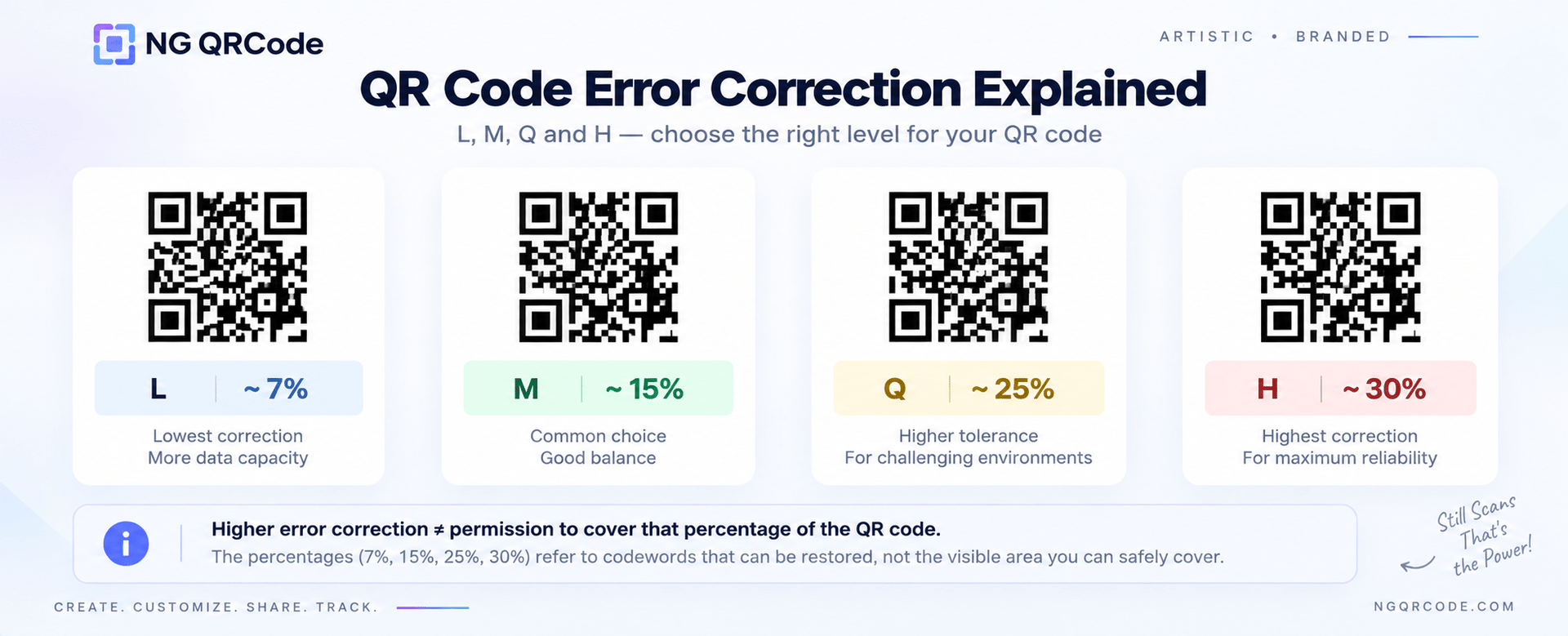
QR codes are designed to remain readable even when part of the code becomes dirty, damaged, or obscured.
This is possible because QR Codes use error correction.
There are four QR code error correction levels:
- L — approximately 7%
- M — approximately 15%
- Q — approximately 25%
- H — approximately 30%
These percentages describe the approximate amount of codewords that can be restored, not the percentage of the QR code image that you can safely cover with a logo or artwork.
For standard QR codes, Level M is commonly used, while higher levels can be useful when the QR code needs to tolerate more potential damage or interference.
What Is QR Code Error Correction?
QR code error correction is a built-in mechanism that allows encoded information to be recovered when part of a QR code is damaged or obscured.
QR Codes use Reed-Solomon error correction to add additional information to the original data. This additional information helps the QR code recover data when some of the symbol is no longer readable.
For example, a QR code might become partially damaged because of:
- Scratches
- Dirt
- Printing imperfections
- Wear and tear
- A logo covering part of the code
- Certain artistic design treatments
Error correction can improve the QR code's ability to handle these situations.
However, error correction does not make a badly designed QR code automatically scannable.
Contrast, size, quiet zone, distortion, and the overall design still matter.
What Are the Four QR Code Error Correction Levels?
QR Codes provide four error correction levels: L, M, Q, and H.
| Level | Approx. restoration capability | Typical consideration |
|---|---|---|
| L | 7% | Clean environments, more data capacity |
| M | 15% | General-purpose use |
| Q | 25% | More demanding environments |
| H | 30% | Higher tolerance for damage/interference |
These percentages refer to codewords, not a percentage of the visible QR image that can simply be removed or covered.
Let's look at each level.
QR Code Error Correction Level L
Level L provides approximately 7% error correction.
It provides the lowest error correction capability of the four levels.
It can be appropriate when the QR code is being used in a relatively clean environment and you want to preserve more capacity for encoded data.
For example, a clean digital QR code displayed on a website may not need the same error correction level as a QR code printed on a product that will be handled frequently.
Best suited for:
- Clean environments
- Simple QR designs
- Situations where damage is unlikely
- Cases where data capacity is important
QR Code Error Correction Level M
Level M provides approximately 15% error correction.
This is a common general-purpose choice. DENSO WAVE notes that Level M is selected most frequently in typical use.
For many everyday QR code applications, M provides a practical balance between error correction and QR code size/data capacity.
Best suited for:
- Websites
- Marketing materials
- Business cards
- Menus
- General digital use
- General printed applications
QR Code Error Correction Level Q
Level Q provides approximately 25% error correction.
It provides more recovery capability than L or M.
This can be useful when the QR code is exposed to environments where dirt, damage, or other interference is more likely.
DENSO WAVE gives factory environments as an example where Q or H may be appropriate.
Best suited for:
- More demanding environments
- Printed materials exposed to wear
- Applications where additional damage tolerance is useful
- Some creative QR applications
QR Code Error Correction Level H
Level H provides approximately 30% error correction.
It provides the highest error correction capability available in a standard QR Code.
This can be useful when the QR code needs greater tolerance for damage or visual interference.
However, choosing H does not mean you can freely cover 30% of the QR code with a logo.
That's a common misunderstanding.
The 30% figure relates to codeword restoration, not a guaranteed safe logo or artwork area.
Best suited for:
- High-interference environments
- QR codes that may experience more physical damage
- Some artistic QR code designs
- Designs where additional error correction is desirable
Does Higher Error Correction Make a QR Code Better?
Not necessarily.
Higher error correction provides greater recovery capability, but it also adds more data to the QR code and can increase the QR code's size/density. DENSO WAVE specifically notes that increasing the error correction level increases error correction capability while also increasing the amount of data in the QR Code.
So the goal isn't simply:
“Always use H.”
Instead, choose the level based on the environment, design, and intended use.
A simple QR code in a clean environment may not need H.
A QR code exposed to dirt, wear, or certain design interference may benefit from a higher level.
Does Error Correction Mean I Can Cover Part of a QR Code?
This is one of the most important things to understand.
No.
If you choose H, you cannot simply cover 30% of the visible QR code with a logo and assume it will scan.
The error correction percentage refers to codewords, not the percentage of the image that can safely be covered.
QR codes also contain functional structures that scanners use to locate and interpret the code.
This is why logo placement matters.
For example, covering one of the large finder patterns in the corner can cause problems even if the total covered area appears relatively small.
If you're adding a logo, keep it away from the important corner patterns and test the finished QR code.
Which Error Correction Level Is Best for a QR Code With a Logo?
There isn't one universal answer.
A QR code with a logo introduces additional visual interference, so error correction becomes one consideration when designing it.
A practical approach is:
- Keep the logo relatively small.
- Place it near the centre.
- Avoid the three large corner finder patterns.
- Maintain strong contrast.
- Choose an appropriate error correction level.
- Test the finished QR code.
Our guide on QR code logo size covers this in more detail.
Most importantly, don't use error correction as an excuse to make the logo larger than necessary.
Which QR Code Error Correction Level Should You Use for Artistic QR Codes?
Artistic QR codes require more attention because the visual treatment can be much more complex than a traditional QR code.
If you're using:
- Custom colours
- Logos
- Textures
- Images
- Shapes
- AI-generated artwork
- Decorative backgrounds
then the final QR code should be tested carefully.
A higher error correction level may provide additional tolerance, but it doesn't guarantee scannability.
An artistic QR code can still fail because of:
- Poor contrast
- Excessive distortion
- Insufficient quiet zone
- Very small size
- Complex backgrounds
- Excessive visual interference
This is why artistic QR code design should balance creativity, structure, and scanning reliability.
For more on this, see our guide to QR code design.
What Error Correction Level Should I Use for Printing?
The right level depends on the printing environment.
Consider where the QR code will be used.
Business cards
A standard level such as M can be appropriate for a clean, controlled application.
Posters and advertisements
M or a higher level may be considered depending on the design and environment.
Product packaging
Consider the material, handling, printing quality, viewing distance, and likelihood of damage.
Outdoor applications
Higher error correction may be useful when the QR code could experience dirt, wear, or environmental exposure.
Artistic QR codes
Consider the amount of visual interference and test the final design rather than relying only on the selected error correction level.
There is no single level that is correct for every printed QR code.
Does Higher Error Correction Make a QR Code Bigger?
It can affect the QR code's size and density.
DENSO WAVE explains that increasing the error correction level increases the amount of data in the QR Code.
This means you should consider error correction together with:
- Amount of encoded data
- Physical QR code size
- Printing method
- Scanning distance
- Design complexity
A QR code isn't just an image. Its physical implementation matters.
QR Code Error Correction vs QR Code Size
Error correction and physical size solve different problems.
Error correction helps the QR code recover information when part of its symbol is damaged or obscured.
Physical size determines how large the QR modules appear to the scanner.
A QR code with high error correction isn't automatically readable when printed extremely small.
Likewise, making a QR code physically large doesn't compensate for poor contrast or excessive visual interference.
You need to consider both.
How to Choose the Right QR Code Error Correction Level
Use this simple decision process:
Step 1: Where will the QR code be used?
Is it:
- On a website?
- On packaging?
- On a poster?
- On a menu?
- On a business card?
- Outdoors?
- In a factory or industrial environment?
Step 2: How much interference will it experience?
Consider:
- Dirt
- Scratches
- Wear
- Logos
- Artwork
- Background images
- Printing imperfections
Step 3: Consider the QR code's data
More encoded data can result in a denser QR pattern.
Step 4: Choose an appropriate error correction level
Use L, M, Q, or H according to the application rather than automatically choosing the highest level.
Step 5: Test the final QR code
This is the most important step.
Scan the actual final version using multiple phones and, for printed applications, test the printed version.
QR Code Error Correction: Quick Reference
If you need a quick reference:
L — 7%
Lowest error correction. Useful for relatively clean environments.
M — 15%
General-purpose option and commonly used.
Q — 25%
Higher error correction for more demanding conditions.
H — 30%
Highest standard QR Code error correction level.
These figures represent approximate restoration of codewords. They do not represent the percentage of the QR image that can safely be covered.